 BLOCK
BLOCKAlpine cabin shell
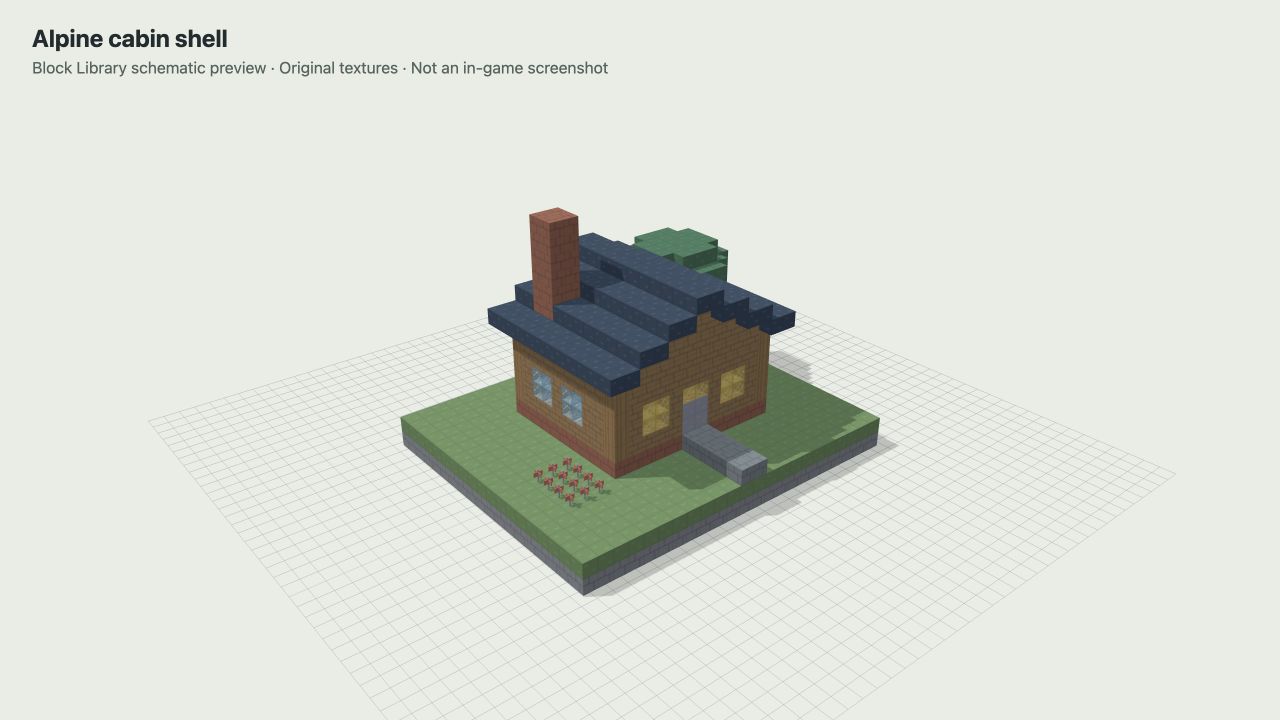
A compact spruce shell with stained-glass windows, a tiled gable roof, a paired entrance, and a decorative brick chimney. The enclosed room is intentionally unfurnished: plan your own bed, storage, crafting area, and lighting before treating it as a finished survival home.
23 wide × 15 high × 19 long; 1,566 placed blocks. The room inside the walls measures 10 × 8 block positions. The path approaches from the front edge of the plot; the spruce tree and flower patch occupy the outdoor space. The chimney is a solid decoration, with no fire or working fireplace.
Build the stone base and floor first, then the posts and windowed walls. Close the front and rear gables before completing the roof. Keep the two-block-wide entrance clear while finishing the interior, and add your own light sources before using the cabin at night.
Preview and download the alpine cabin shell · .litematic · 1,656 bytes.
Explore the cabin layer by layer
Local coordinates start at the plot’s corner: X increases right, Z down; north is up (−Z). Layer 1/Y=0 is the buried foundation; layer 2/Y=1 is ground. Letters identify materials; dots mean air.
Fixed plan: layer 3 (Y=2). Enable JavaScript to explore every saved layer.
Each square is one saved block position. Read the complete material counts below the three designs.
Counts are saved positions in this layer, not crafted items or water buckets. Use a square or the coordinate form to inspect the full block state.
| Letter | Material | Positions |
|---|---|---|
| B | cobblestone | 10 |
| F | poppy | 12 |
| I | spruce log | 1 |
| L | stone bricks | 120 |
Verify this plan’s source
Generated from the same original geometry as block-library-cabin-v1.litematic. Schematic SHA256: 74036e0387a9c185da1dc071f691576b3910e1fb99f77898792a9ac5840f96f9. These diagrams show file contents; placement and gameplay inside Minecraft remain untested.
Cherry garden pavilion
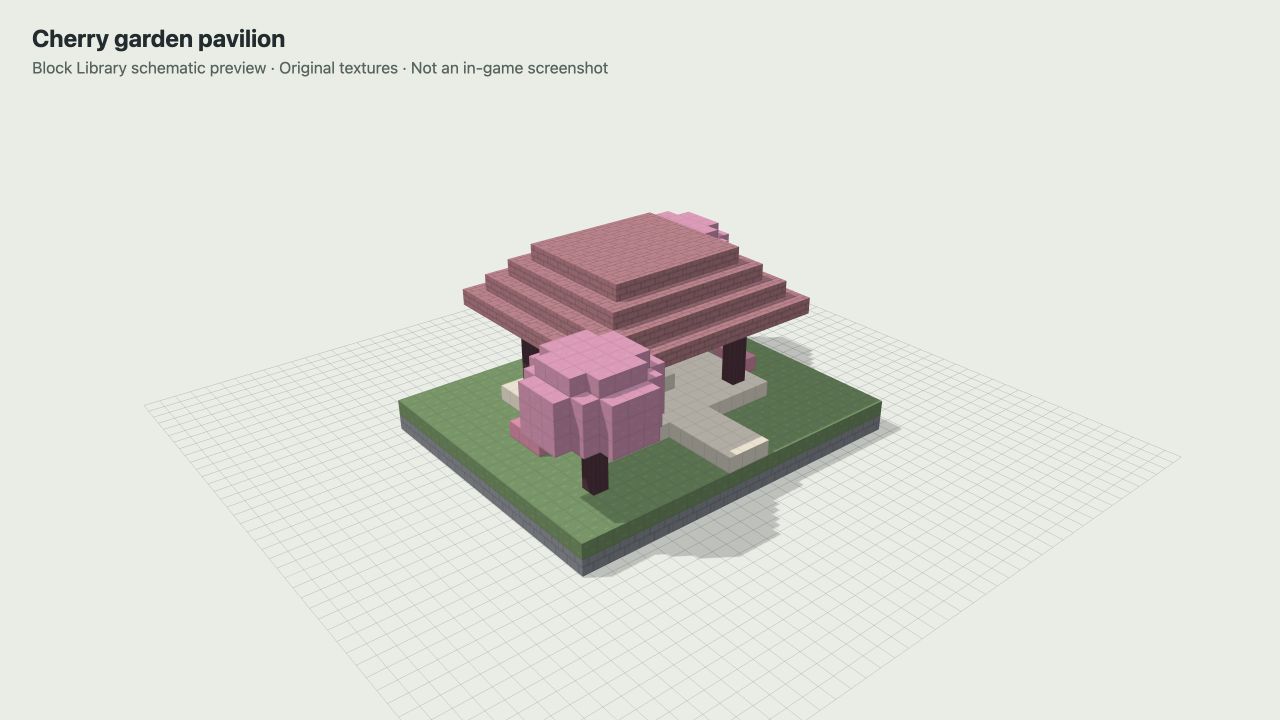
An open garden structure with four cherry-log pillars, a broad stepped roof, central stone seating, a quartz approach, and two cherry trees. It gives a garden or courtyard a focal point without enclosing the view.
23 wide × 12 high × 19 long; 1,853 placed blocks. Its 524 cherry planks make the roof the largest decorative material commitment. The wide bottom roof layer extends beyond the pillars, so check the overhang against nearby paths and trees.
Lay the quartz platform and approach before raising the pillars. Build the roof from its widest layer upward, reducing the rectangle at each level. The open sides are deliberate: this is a gathering place, not a protected survival shelter. Leave enough room to walk around the central seating.
Preview and download the cherry garden pavilion · .litematic · 1,176 bytes.
Explore the pavilion layer by layer
Local coordinates start at the plot’s corner: X increases right, Z down; north is up (−Z). Layer 1/Y=0 is the buried foundation; layer 2/Y=1 is ground. Letters identify materials; dots mean air.
Fixed plan: layer 3 (Y=2). Enable JavaScript to explore every saved layer.
Each square is one saved block position. Read the complete material counts below the three designs.
Counts are saved positions in this layer, not crafted items or water buckets. Use a square or the coordinate form to inspect the full block state.
| Letter | Material | Positions |
|---|---|---|
| B | cherry log | 2 |
| E | pink petals | 6 |
| G | smooth quartz | 145 |
Verify this plan’s source
Generated from the same original geometry as block-library-pavilion-v1.litematic. Schematic SHA256: dc33279fa9b01ae384b0df77b640be91ac21e37a847a265285cd5a32e4f5b51e. These diagrams show file contents; placement and gameplay inside Minecraft remain untested.
Mossy stone garden bridge
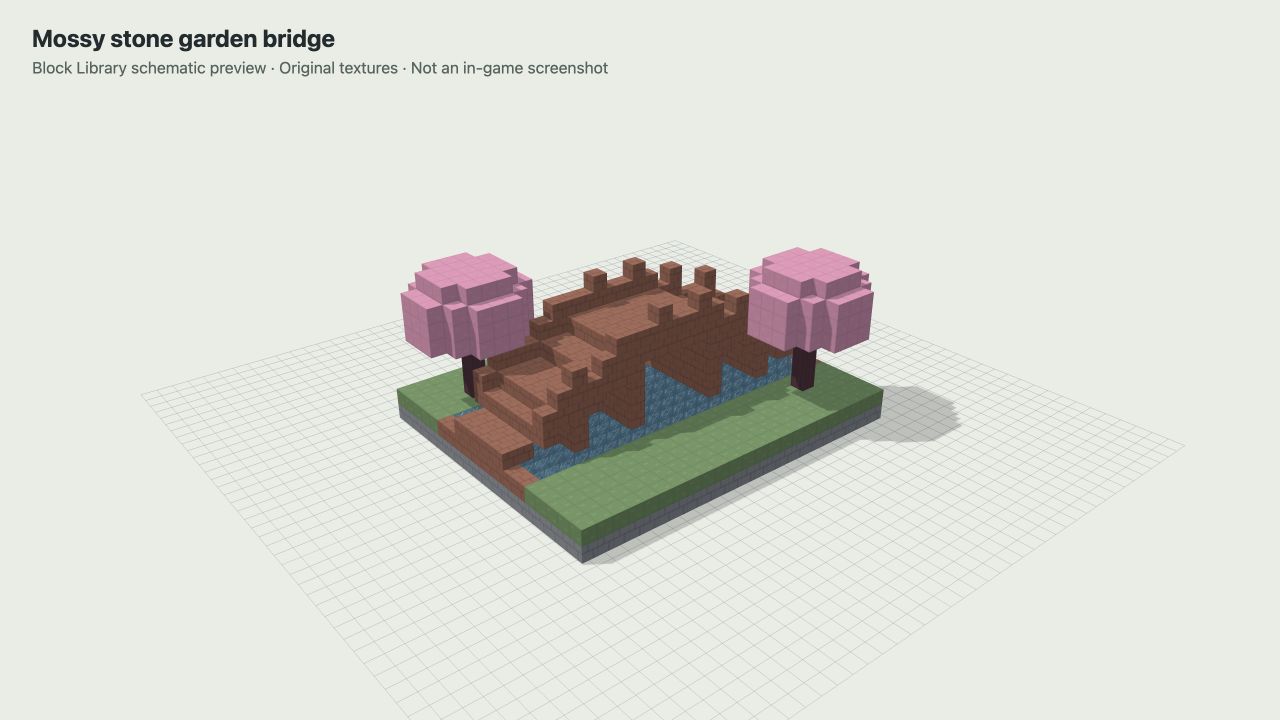
A five-block-wide crossing with mossy parapets, stone supports, and flowering cherry trees at the banks. The included water is a shallow, bounded pool inside the plot, so the design can be inspected without first finding a river.
23 wide × 10 high × 19 long; 1,431 placed blocks, including 189 water positions. The crossing rises in full-block steps and has lower approach steps at both ends. Plan to jump between height changes or adapt the deck with stairs after a separate placement test.
Build the pool floor and banks before adding water. Then place the supports, raised deck, and parapets. If you remove the included ground to fit an existing stream, recheck the supports and banks; the original water containment depends on that surrounding plot.
Preview and download the mossy stone garden bridge · .litematic · 1,269 bytes.
Explore the bridge layer by layer
Local coordinates start at the plot’s corner: X increases right, Z down; north is up (−Z). Layer 1/Y=0 is the buried foundation; layer 2/Y=1 is ground. Letters identify materials; dots mean air.
Fixed plan: layer 3 (Y=2). Enable JavaScript to explore every saved layer.
Each square is one saved block position. Read the complete material counts below the three designs.
Counts are saved positions in this layer, not crafted items or water buckets. Use a square or the coordinate form to inspect the full block state.
| Letter | Material | Positions |
|---|---|---|
| B | cherry log | 2 |
| F | stone bricks | 48 |
Verify this plan’s source
Generated from the same original geometry as block-library-bridge-v1.litematic. Schematic SHA256: 7789c160af4c1fba023ddda4141332c15549f72b7cc7542bbd69a644c3fc11c7. These diagrams show file contents; placement and gameplay inside Minecraft remain untested.
Compare material counts
These numbers are counted from the complete saved geometry, including the ground, water, trees, and hidden foundation. They are block positions, not a crafting shopping list: four door positions represent two doors, and 189 water positions do not mean you need 189 buckets. Leaf states are marked persistent in the file. Use Litematica’s Material List for your actual placement and chosen substitutions.
| Material | Cabin | Pavilion | Bridge |
|---|---|---|---|
| Bricks | 28 | 0 | 0 |
| Cherry leaves | 0 | 264 | 264 |
| Cherry log | 0 | 28 | 8 |
| Cherry planks | 0 | 524 | 0 |
| Cobblestone | 10 | 0 | 0 |
| Deepslate tiles | 157 | 0 | 0 |
| Grass block | 437 | 437 | 230 |
| Light blue stained glass | 8 | 0 | 0 |
| Mossy stone bricks | 0 | 0 | 68 |
| Pink petals | 0 | 6 | 0 |
| Polished diorite | 0 | 12 | 0 |
| Poppy | 12 | 0 | 0 |
| Smooth quartz | 0 | 145 | 0 |
| Spruce door | 4 | 0 | 0 |
| Spruce leaves | 131 | 0 | 0 |
| Spruce log | 4 | 0 | 0 |
| Spruce planks | 190 | 0 | 0 |
| Stone | 437 | 437 | 437 |
| Stone bricks | 120 | 0 | 235 |
| Stripped spruce log | 18 | 0 | 0 |
| Water | 0 | 0 | 189 |
| Yellow stained glass | 10 | 0 | 0 |
| Total | 1,566 | 1,853 | 1,431 |
Place and adapt a design
- Check the file and tool. These designs are
.litematicblueprints. Use a Litematica release matching your Minecraft installation; follow the Litematica setup guide. A file’s saved version is not proof that it behaves correctly in your chosen version. - Start in a disposable creative world. Inspect the full placement and its material list. These originals have not completed an in-game test, so use the source notes to compare expected geometry with the placed result.
- Align the foundation. The lowest layer is stone at local Y=0, with grass or water at Y=1. Set the lowest layer one block below your intended ground-block layer. Each file includes the entire rectangular plot; plan excavation before placing it over existing terrain.
- Inspect the ground-level routes. Check the cabin doorway, the space around the pavilion seating, and both bridge approaches. Review tree clearance and roof overhangs from the surrounding paths.
- Adapt one part at a time. Recheck a changed palette, roof, or water bank in the test world. Keep the original file and world backup until you have compared the result.
What we checked
We generated these files from original procedural layouts, then decoded the saved NBT and compared every block coordinate and block state against the source. The checks cover dimensions, material counts, author metadata, deterministic file hashes, paired door halves, closed cabin gables, persistent leaves, and the bridge’s water boundary and approach blocks.
The files target the Java 1.21 saved format, with Minecraft data version 3955. We have not tested placement, lighting, movement, or appearance inside Minecraft. The browser viewer uses Minecraft Java Edition textures; the images on this page were captured with earlier Block Library patterns. They are not in-game screenshots. No performance or gameplay-compatibility claim is implied by the file checks.
The layer explorers let you inspect every saved block position and state, including the foundation, paired door halves, roof levels, leaves, and water. They work entirely on this page and do not upload files or create download events.
The catalog links above include a 3D preview, file checksum, source attribution, and download. Automated file checks and content review do not replace testing a placement in your own Minecraft version.
Source and reuse
The three layout designs and generated schematics are original Block Library work, released under CC0-1.0. You may adapt and share those designs under that dedication. The files contain block names and placement data, with no copied game textures or private world saves.
The generation source builds on our original geometry. The release notes explain reproduction, the license, and the review path. Report an incorrect count or placement issue through Contact & corrections, including the file name and game/tool versions.